
social

pop

Operation of relay types

What is relay?

It is switch that provides the safety to an electrical circuits from the abnormal conditions. Relay has two parts which is NO ( normally open ) and NC ( normally close ). 

NO means the circuit are normally open, In this conditions the electric supply does not passes through the circuit due to the open circuit conditions. This type of relays are use in mechanical devices like hoist and manipulator for controlling.

NC means the circuit is normally close, In this conditions the electric current can flow through the circuit due to the circuit is close And this relay coil is use as On switches in mechanical devices like hoist and manipulators.
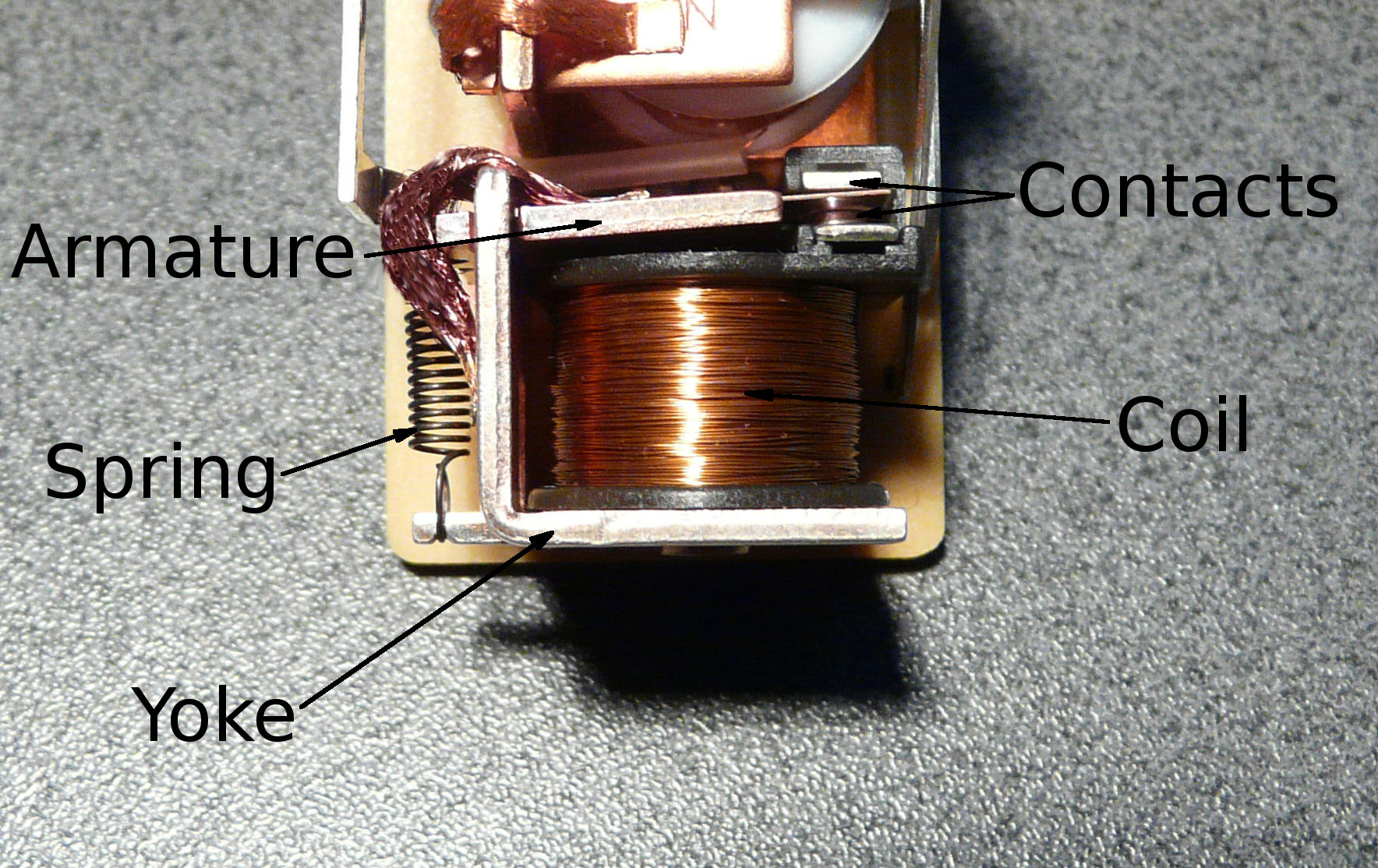

File:Relay Parts.jpg - Wikimedia Commons


Operation of relay


Relay works on the principle of electromagnetic, it is use to link the input and output circuit. When the current flows through the relay it will link input and output circuit together. if an abnormal current is detected then relay operates as a open circuit to cut off the current flow and save the equipment from faulty current.

Types of relays


1. Electromagnetic relay.
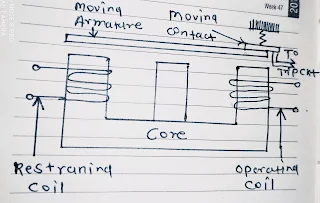

Electromagnetic relay


This type of relays are made with the electrical and mechanical components, which have coils and mechanical contacts. when the current is flows through the circuit its coil gets activated and contacts being open or closed. 


2. Induction type relay. 


Induction type relay


This types of relay is use as a protective relay in the AC circuit, when an excessive current is flow through the circuit its produce an force. Due to this the contacts of relay gets move and it will attracts the conductor. 


3. Solid state relay.


solid state relay


This type of relay does not have any moving parts, it is made with solid state. The energy requirement of this relay is low, hence it will produce the higher output power to control the devices.


4. Thermal relay.


Thermal relay

In this type of relay working principle is depends upon the heat and temperature controlling sensors. When the its sense the over limit temperature or heat it will operates and open or close the circuit.


Advantages of relay.


  1. Reliable operations.
  2. Fast operation as compared to the EMR.
  3. It is use for AC as well as DC supply.
  4. It is use for high voltage applications.
  5. It can operates many contact at a time.
  6. There is a no sparking occurred between the contacts.
  7. It is also prepared for large current applications.

Applications of relay.


  1. It is use in robotics.
  2. It is use for home appliances.
  3. It is use in office machines.
  4. It is use in audio equipment.
  5. It is use in remote control of TV.
  6. It is use for automobiles. 

Specifications of relay.


1. Contact Material = Silver oxide complex alloy.
2. Contact switching voltage = 16 vDC max , 5 vDC min.
3. Contact switching current = 25 A max.
4. Operating time = 2.5 ms.
5. Released time = 3 ms.
6. Nominal operate power = 640 mW.


Popular posts from this blog

How to Install Proteus 8 Professional: A Step-by-Step Guide

 How to Install Proteus 8 Professional: A Step-by-Step Guide Proteus 8 Professional is a powerful tool for electronic circuit design and simulation. Whether you’re a student, hobbyist, or professional engineer, following a clear installation process ensures you get started without headaches. Are you ready to start designing and simulating electronic circuits with Proteus 8 Professional!   Here’s a comprehensive, guide to installing Proteus 8 Professional on your Windows PC. Step 1: Download the Installer ·        Visit the official Labcenter Electronics website or another trusted source to download the Proteus 8 Professional installer. Avoid unofficial sources to prevent malware or corrupted files . You can download from HERE DOWNLOAD PROTEUS AND ARDUINO ·        The installer typically comes as a ZIP file. Wait for the download to finish and locate it in your Downloads folder Step 2: Extract the Installer...

Interfacing a 16X4 LCD

Interfacing 16X4 LCD Simulation is done with Proteus ISIS code: MikroC Requirements: 16X4 LCD PIC16F877A 8 MHz oscillator A variable resistor (5k) 22pF capacitor A resistor (10k) Circuit Diagram of 16X4 LCD and code is shown below  // Begin LCD configuration sbit LCD_RS_direction at TRISB0_bit; sbit LCD_EN_direction at TRISB1_bit; sbit LCD_D4_direction at TRISB2_bit; sbit LCD_D5_direction at TRISB3_bit; sbit LCD_D6_direction at TRISB4_bit; sbit LCD_D7_direction at TRISB5_bit; sbit LCD_RS at RB0_bit; sbit LCD_EN at RB1_bit; sbit LCD_D4 at RB2_bit; sbit LCD_D5 at RB3_bit; sbit LCD_D6 at RB4_bit; sbit LCD_D7 at RB5_bit; // End of LCD configuration void main() { char txt1[]="welcome to 16x4"; char txt2[]="LCD display";   char txt3[]="by"; char txt4[]=" EKETECH "; TRISB=0X00;   // Configure PORTB as output PORTB=0X00;        // initialise PORTB while(1)       ...

Download HND Past Questions and Solutions

Download Cameroon HND Past Questions & Solutions Boost your exam prep with past papers and answers across all fields! How to Access Past Questions Visit the Cameroon HND Platform or trusted sites like EKETECH . Browse by field : Select your program (e.g., Civil Engineering , Banking and Finance , Nursing ). Download PDFs for free or via subscription. Practice with solutions : Review answers to refine your understanding. Fields of Study Covered Past questions are available for all HND programs in Cameroon, including: Engineering Civil Engineering Design Software Engineering Electrical Power Systems Telecommunication Mechanical Engineering Computer Engineering Medical Sciences Nursing Medical Laboratory Studies Health Care Management Physiotherapy Nutrition and Dietetics Agriculture Agribusiness Management Agricultural Engineering Food Technology Integrated Agriculture Business Accounting Banking and...