social

pop

What is Touch Potential?

What is Touch potential?

You often came across the term step and touch potential, but you never new what's all about. Grab it now.

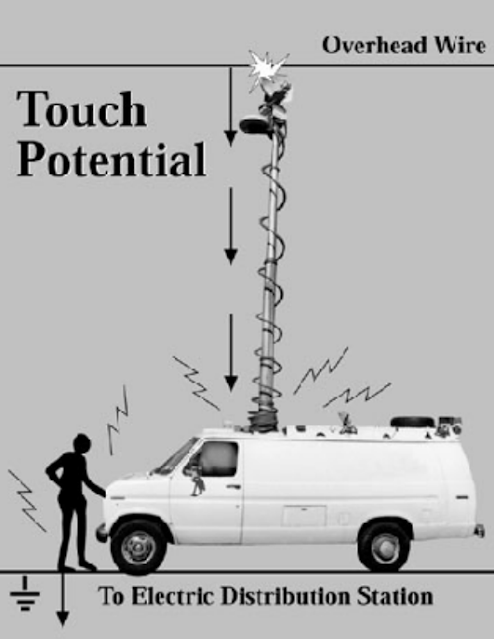
Touch potential is the potential generated across a conductive body or object to the earth, when the conductive body contacts or touches a live wire. So, current flow through the conductive body from the live wire to the earth. 
This can occur due to earth failure and inappropriate earthing in an installation. Other causes exist.
To illustrate this, we are going to see some common examples.

How touch potential is generated

1) A person touching a poorly earthed conductive part during earth failure. E.g touching the metallic part of towers, machines, etc during earth failure.
What is Touch potential


2) Live TV media antenna buses mistakenly touching live wires in transmission lines.

Touch potential

Touch potential


3) Excavators and lifters mistakenly touching a transmission line
Touch potential

Those are just some few examples of how touch potential is generated.
So, electrical technicians must be
ware of touch potential when working. Otherwise they may receive an electric shot and burns which can led to several damages and even death.

Related:

What is step potential?


Popular posts from this blog

How to Install Proteus 8 Professional: A Step-by-Step Guide

 How to Install Proteus 8 Professional: A Step-by-Step Guide Proteus 8 Professional is a powerful tool for electronic circuit design and simulation. Whether you’re a student, hobbyist, or professional engineer, following a clear installation process ensures you get started without headaches. Are you ready to start designing and simulating electronic circuits with Proteus 8 Professional!   Here’s a comprehensive, guide to installing Proteus 8 Professional on your Windows PC. Step 1: Download the Installer ·        Visit the official Labcenter Electronics website or another trusted source to download the Proteus 8 Professional installer. Avoid unofficial sources to prevent malware or corrupted files . You can download from HERE DOWNLOAD PROTEUS AND ARDUINO ·        The installer typically comes as a ZIP file. Wait for the download to finish and locate it in your Downloads folder Step 2: Extract the Installer...

How to Draw A Three-Phase Waveform and Its Importance

How to Draw A Three-Phase Waveform and Its Importance  Learn how to easily draw a three-phase AC waveform step-by-step, a fundamental skill for power electronics and power systems engineers. Discover its critical role in efficient power delivery for industrial applications and renewable energy systems. Method 1: Easiest Triangular Wave Connection to draw a three phase wave form Sketch three identical triangular waves, each spanning 360° with linear rises from 0° to 90° (peak), falls to 180° (zero), dips to 270° (-peak), and returns to 360° (zero). Label them R (rise starts at 0°), Y (rise at 120°), and B (rise at 240°); connect their outer tips externally with straight lines to approximate a continuous three-phase waveform set. This quick method visually captures 120° phase shifts without curve drawing, ideal for fast teaching or power electronics sketches. Method 2: Standard Sine Wave Drawing Plot on a time (0°-360°) vs. voltage axis: draw R-phase as a full sine wave p...

Interfacing Relay Circuit in Proteus with Arduino

  Interfacing Relay Circuit in Proteus with Arduino Using Push Button Activation Learn how to simulate a relay circuit interfaced with Arduino in Proteus, where a push button activates switching to safely control a motor powered by a 220V AC source. What is a Relay Circuit? A relay circuit uses a relay as an electrically operated switch to control high-power loads through a low-power signal. The setup includes a relay coil powered by 5V from Arduino, a driver transistor/module, freewheeling diode for protection, and contacts connected to the load like a 220V AC motor. When energized, the coil's magnetic field closes contacts to allow current flow; de-energizing returns them via spring action. This Proteus simulation demonstrates button-activated relay control with Arduino Uno. The push button sends a low-voltage signal to toggle the relay, switching the motor while an LED provides visual status indication Key Components for Interfacing Relay Circuit ·      ...