social

pop

Simulation and analysis of RC circuit in MATLAB

MATLAB SIMULATION OF SERIES RC CIRCUIT

This will be divided into:
  • Practical analysis
  • Theoretical analysis
  • Conclusion
Circuit diagram of RC circuit
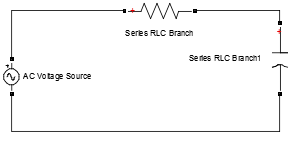
RC circuit
Using the RC branch, with R = 1Ω and C=1000uF

MATLAB SIMULATION
Matlab RC circuit

WAVE FORMS
  • Scope 2
Input voltage
Current flowing in the circuit
Voltage drop across the capacitor 
Matlab Rc circuit curve

Observing the wave form from scope2, we can see that the wave form of the current leads the wave form of the voltage by 900. This is in line with the fact that in pure capacitive circuit the current leads the voltage by an angle of 90o and in a non-pure capacitive circuit by an angle < 900.
  • Scope 3
Voltage drop across the capacitor
Voltage drop across the resistor 
Matlab RC circuit curve simulation

From scope3, we observe that the voltage across the capacitor (VC) , is out of phase with the voltage across the resistor (VR ) by 900.
Where VC lags VR with VR and I in phase.

THEORITICAL ANALYSIS
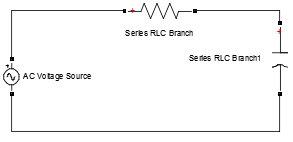
Matlab simulation of RC circuit
Using the RC branch, with R = 1Ω and C=1000uF

A) Determination of Vrms 
Calculation of root mean square value
B) Determination of the current in the circuit
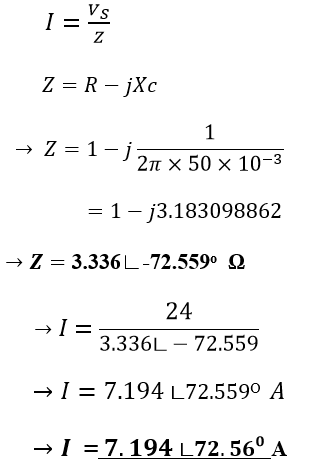
Rc circuit analysis in MATLAB

C) Determination of voltage drop across the capacitor.
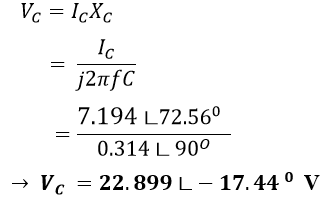
Matlab voltage drop across capacitor

D) Determination of voltage drop across the resistor
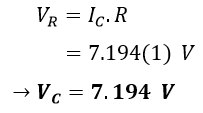
Matlab voltage drop across resistor

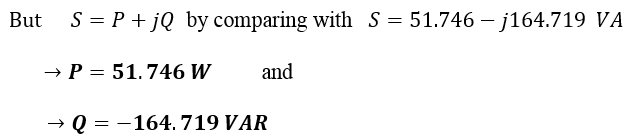
E) Determination of the power ( Apparent power, Active power and Reactive power)

  • Apparent Power
RC apparent power in MATLAB
  •    Active and Reactive power
Active and reactive power calculation
    
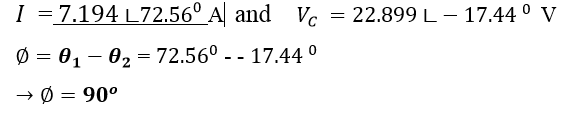
   F) Calculation of phase differences

Phase difference calculation in RC circuit

CONCLUSION
The table below shows the various values obtained from the simulation using Matlab and from theoretical analysis. These would enable us to draw a conclusion.

Theoretical and practical comparison of MATLAB result
From the table, by comparing the theoretical and the simulated results we see that the results are coherent.

By EKETECH

Popular posts from this blog

PAST GCE QUESTIONS AND SOLUTIONS

 GCE PAST QUESTIONS AND SOLUTIONS TECHNICAL GCE ITVE and GCE ATVE Questions and Answers DOWNLOAD All ELECTRICAL POWER SYSTEM   DOWNLOAD All ELECTRONICS   DOWNLOAD All AIR CONDITIONING DOWNLOAD All MECHANICAL MANUFACTURING DOWNLOAD All AUTOMOBILE MECHANICS DOWNLOAD All SHEET METAL DOWNLOAD All WOOD WORKS    DOWNLOAD All BUILDING CONSTRUCTION DOWNLOAD All TOPOGRAPHY DOWNLOAD All CIVIL ENGINEERING DOWNLOAD All COMPUTER SCIENCE   DOWNLOAD All ICT DOWNLOAD All  ICT DOWNLOAD All CHEMICAL ENGINEERING DOWNLOAD All TOURISM DOWNLOAD All ACCOUNTING DOWNLOAD All  ICT DOWNLOAD All MATHEMATICS DOWNLOAD All LAW DOWNLOAD All ENGINEERING SCIENCE GENERAL EDUCATION GCE QUESTIONS AND SOLUTION DOWNLOAD All MATHEMATICS DOWNLOAD All FURTHER MATHEMATICS DOWNLOAD All ADDITIONAL MATHEMATICS DOWNLOAD All PHYSICS DOWNLOAD All BIOLOGY DOWNLOAD All HUMAN BIOLOGY DOWNLOAD All  ICT DOWNLOAD All CHEMISTRY DOWNLOAD All GEOGRAPHY DOWNLOAD All ECONOMICS DOWNLOAD All HISTORY D...

How to Install Proteus 8 Professional: A Step-by-Step Guide

 How to Install Proteus 8 Professional: A Step-by-Step Guide Proteus 8 Professional is a powerful tool for electronic circuit design and simulation. Whether you’re a student, hobbyist, or professional engineer, following a clear installation process ensures you get started without headaches. Are you ready to start designing and simulating electronic circuits with Proteus 8 Professional!   Here’s a comprehensive, guide to installing Proteus 8 Professional on your Windows PC. Step 1: Download the Installer ·        Visit the official Labcenter Electronics website or another trusted source to download the Proteus 8 Professional installer. Avoid unofficial sources to prevent malware or corrupted files . You can download from HERE DOWNLOAD PROTEUS AND ARDUINO ·        The installer typically comes as a ZIP file. Wait for the download to finish and locate it in your Downloads folder Step 2: Extract the Installer...

Download GCE syllabus | scheme of work all subjects

GCE syllabus secondary education Cameroon  570 Mathematics ♻️DOWNLOAD 570 Math 📲 575 Additional Mathematics ♻️DOWNLOAD Additional Mathematics📲 775 Further Math 🆓 Download Further Mathematics📲 Physics Ordinary Level 🆓 Download Physics Ordinary Level 📲 Physics Form 3-5 🆓 Download Physics Form 3 to Form 5 📲 Physics New Form 1 to 2 🆓Download Physics Form 1 and 2 📲 530 English Language 🆓 Download English Language 📲 540 Food and Nutrition 🆓DOWNLOAD FOOD AND NUTRITION 📲 545 French 🆓DOWNLOAD FRENCH 📲 590 Logic 🆓 LOGIC 📲 Chemistry Form 1 to Upper Six 🆓 DOWNLOAD CHEMISTRY Form 1 to U6📲 Chemistry Second Cycle 🆓Download CHEMISTRY Second Cycle📲 Geography  🆓DOWNLOAD GEOGRAPHY 📲 Geography Form 3-5 🆓DOWNLOAD GEOGRAPHY Form 3 to 5📲 History, Geography, Citizenship Form 1-2 🆓Download HISTORY, Geography, CITIZENSHIP📲 Geology 🆓Download  GEOLOGY 📲